Tuesday, 6 September 2016

WIKIPEDIA AS ANDROID APP
Hello readers you must be using Wikipedia for searching something and to get information about many things
Now you no longer need to go always to your pc for Wikipedia you can access it from your android device & the app have more features that will be discussed later in this article


HOW  IT  WORKS
You need to download this app from Google play store


When you open it. The first screen you will see is its homepage. You can see many things on that page


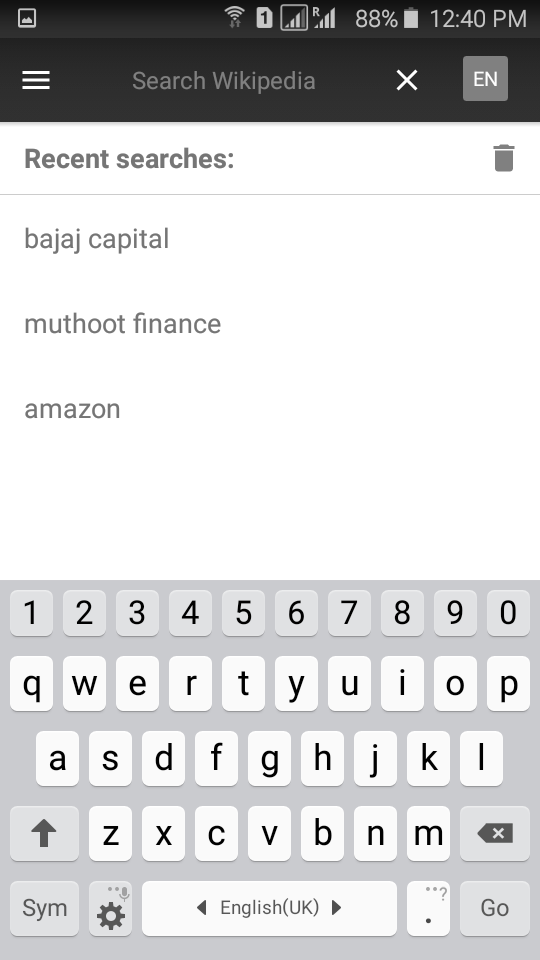
At the top there will be search option. You can search in text or voice anything you want & in many languages as it support 300 languages


On the main screen you will see trending news for today as you go down, you will see se the older articles. You can tap any article to read it. You can share or save it in reading list to view or read anytime even in offline mode


When you click right top corner, you will see some options there also. You can change font size & theme. You can click highlighted words to know its meaning.


You can press and hold any word to copy, share or for knowing its meaning. 


You can slide left or tap the left top corner option to go on homepage, history, reading list, to know about nearby, random search and setting to manage the app
This option is also available on homepage


Thank you for reading this article if you like it please don’t forget to like, comment or share. If you want any of my articles in Hindi please comment your email id or contact me at appsaddaa@gmail.com
HAPPY BLOGGING

Saturday, 3 September 2016

CONVERT YOUR PICTURE INTO CARTOON AND USE OTHER INRESTING PATTERN BY THESE 3 ANDROID APPS

Hello readers there are 3 android from which you can convert into different interesting patterns and also you can replace prisma from these apps it totally depends on your interest.
You need to download these from Google play store


THESE APPS ARE –
  • CARTOON CAMERA – After downloading when you open the app

Camera will get open in the app, you can on/off its flash light, use the back or rear camera for selfie, from the brush given at the bottom you can use different cartoonish effects to take the pictures & from camera given at the right bottom you can click the pictures. You can adjust the coloring from left scale & sensitivity from the right scale. You can view the clicked pictures in gallery

  • CARTOON PHOTO – After downloading this app when you open it

On the homescreen it will show you 4 options –
Photos – from this option you can select the images from gallery that you want to want to edit and use the effects according to your choice
Camera – from this option the camera will get open in the app and you can take pictures with different effects given at the bottom of the screen & you can view the clicked picture by clicking the eye option given in the left top corner or share the image from the option given in the right top corner.


video -- You can make video or adjust the camera effects from the option given at the right bottom corner

Pro-version – this option will take you to pro version of this app in Google play store and this version is not free, you have to pay for it
  • PHOTO LAB – this app is very interesting and its fun to edit the picture with it
After downloading this app  when you open it
Its homepage will get open and you can see there are different features given at the top of the page


Seasonal – in this feature you can get your pic edit according to different seasons like summer, raining etc….


Facebook test – in this feature various activities for you are available & it will connect to your facebook profile


Categories – in this feature different categories for editing are available.


Popular – in this feature popular options for editng are available


Favorites – in this feature it will show you the editing effects which you have mark as favorite

 On the left top an option is given on tapping that option you can view as list and you can use it after tapping the feature


This app needs internet connection
Also it contains adds but it is awesome to edit the picture

Thank you for reading this article if you like it please don’t forget to like, comment or share. If you want any of my articles in Hindi please comment your email id or contact me at appsaddaa@gmail.com

HAPPY BLOGGING

Monday, 29 August 2016

                             PRISMA APP FOR ANDROID

Hello readers prisma in iphone is trending but android users are worried that how will they use prisma well there is no need to worry because now prisma app is available in android also and now android users can also convert their pictures into cartoonic picture


                                   HOW  IT  WORKS

Initially you need to download the app prisma from Google play store


when you open it the camera open on the first screen to take the pictures or you can select the picture from gallery by the option given in the right bottom you can convert the image in to many different themes which are available in this app You can decrease or increase the effect of that theme which you select for the image


After converting the pictures you can share or save them from the option give just above the themes of the right
You can manage from from settings  which is available in the middle right


This app needs internet connection & it is a bit slow as many users are using it
Alternatives for prisma in android are also available for users
I will come back with them soon till then.......

Thank you for reading this article if you like it please don’t forget to like, comment or share. If you want any of my articles in Hindi please comment your email id or contact me at appsaddaa@gmail.com

HAPPY BLOGGING

Saturday, 27 August 2016

          IMPROVES YOUR MATHS WITH MATHSAPP
Hello readers, there is an app which can really improve your calculations or maths. This app name is mathsapp


                   HOW  IT  WORKS

Initially you need to download this app from Google play store then when you open it there will be 3 options-
Google login
Facebook login
Continue login


It you want to just try the app then you can continue as guest
After that home page of the app will get opens and there are many options will be shown to you –
  • Know by heart
  • Check you memory
  • Calculate magically
  • How quick are you
  • Challenge yourself
  • Your report card

Now I am going to explain these options –

  • KNOW BY HEART – From this option you can learn tables, square, cube root etc...


CHECK YOUR MEMORY – From this you can test your memory that how fast and long you can retain the things you have learn 


 CALCULATE MAGICALLY – In this you can learn how fast you can calculate something


 HOW QUICK ARE YOU – In this option there are many test you can & levels are also available. Its like a game and its fun to play it


CHALLENGE YOURSELF – It is also a sort of test but you can manage the lessons of test because you can choose the lessons and test your ability in particular calculation


YOUR REPORT CARD – To see your report card you have to sign in first and after sign in you can see your report card of any of the section


        Note: If you sign in from Google or Facebook it will ask you for permission and you have click allow to sign in

You can change your name shown at the top by tapping it or from settings which is given in the right top

Thank you for reading this article if you like it please don’t forget to like, comment or share. If you want any of my articles in Hindi please comment your email id or contact me at appsaddaa@gmail.com

HAPPY BLOGGING


Wednesday, 24 August 2016

TWO ANDROID APPS YOU SHOULD HAVE IF YOU WANT TO GET BEST ONLINE DEAL

Hello friends I am gonna tell you about two apps which can be proved useful for you if you shop online. It will help you to buy good quality product at low price
  1.  SMARTPRIX --  this is an android app which will give you best deals on online products


        HOW  IT  WORKS

Firstly you need to download the app from Google play store

when you the app you will see the deal offered this app and departments


or you can easily select your product & buy it but it will show the name of the online portal which is offering that deal and if you click buy now it will take you to the site or app from which you can actually buy it.


From the option given on the left top, you can select the product in a better way
If you want best online deal it is the best way to get it


The available categories in this app are –
Mobile and tablets
Laptops and cameras
Mobile accessories
Personal care
Books
And deals (which are currently available)

2. 91 MOBILES –
This app is very useful to buy online gadget it can give you can ever get


                                            HOW  IT  WORKS

Initially you need to download this app from Google play store


When you open the app it will show you 2 options i.e. home and story feed


Currently it must be on home  and you can see the options for gadgets, story feed, trending, collections according to feature, upcoming smart phones, latest news and stories about gadgets and best deals offered by different online portals
The gadget it is offering are –
Mobiles
Tablets
Laptops
Televisions
Cameras
Power banks
Washing machines
Refrigerators
Air conditioners
You can also view latest news by tapping on story feed
By pressing the option on left top you can view the other features offered by this app


These are the following –

CHAT WITH EXPERTS – if you are confused about purchasing any gadgets you can ask the experts and it will tell you the best option according to your requirement


COMPARE MOBILES --  it will show difference between some similar mobiles which will help you to choose the best


It will show you notification for a new deal or story feed
You can set price drop alert, product launch alert and view & mark favorites for a product
You can do search, see, notifications, saved searches and favorites from the top on right
when you select the product to buy it will show you a option go to store and you to go to the main site which is offering the deal to buy the product actually


Thank you for reading this article if you like it please don’t forget to like, comment or share. If you want any of my articles in Hindi please comment your email id or contact me at appsaddaa@gmail.com

HAPPY BLOGGING